This JLab JBuds Work review looks at an over-ear headset for desk calls, with Bluetooth multipoint, a wired connection option, and 60+ hours of worktime on one charge.
JBuds Work Review Summary
The quick verdict

1,000+ ratings
Read Amazon ReviewsJLab JBuds Work
A desk headset for buyers who want Bluetooth multipoint, a wired option, and long worktime between charges.
- Bluetooth multipoint connects two devices simultaneously, useful for switching attention between a computer and phone.
- An included USB-C to 3.5mm cable supports wired use as an alternative to Bluetooth.
- The headset offers 60+ hours of worktime on one charge.
- Two microphones are designed to reduce environmental sounds and pick up the wearer’s voice during calls.

Pros
- Multipoint Bluetooth can keep two devices connected at once.
- A wired cable is included for situations where Bluetooth is not preferred.
Consider before buying
- For frequent outdoor calls, check microphone performance in windy conditions before buying.
- The over-ear design and boom mic are desk-oriented; buyers seeking a compact on-ear style may prefer a different form factor.
Read the full review summary
JBuds Work is worth considering if your workday moves between a computer and phone. Bluetooth multipoint connects two devices at once, while the included USB-C to 3.5mm cable offers a wired listening option.
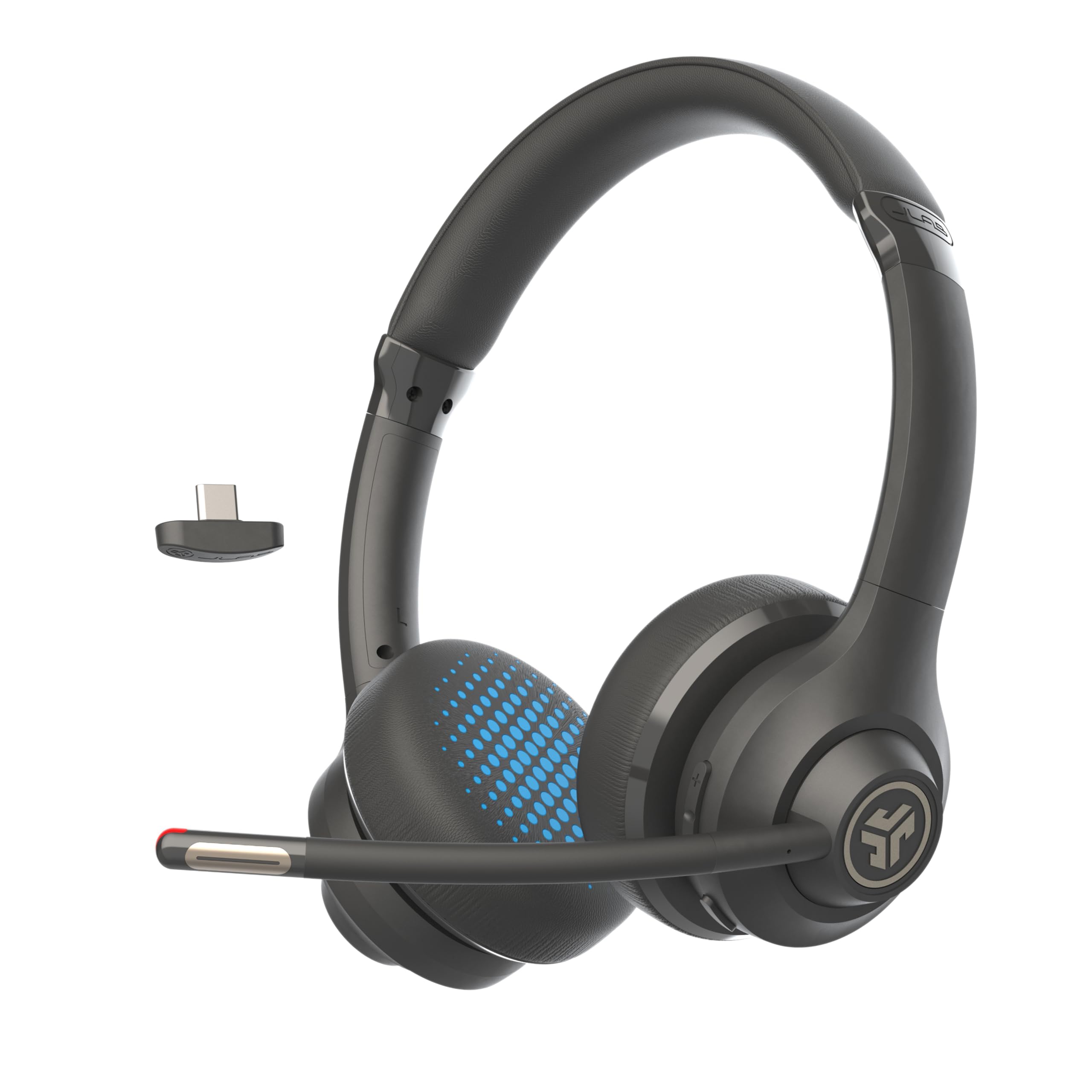
Its over-ear fit and rotating boom mic suit a desk setup where calls and listening share the same headset.
It is particularly suited to people who want fewer charging interruptions and physical controls on the headset.
The dual-microphone noise-canceling call setup and red mute indicator are practical features for meetings, though the product details do not establish how well the microphone performs in a noisy or windy space.
The buying factors
JBuds Work Scorecard
Editorial scores reflect listed features and buyer fit; they are not laboratory measurements or customer ratings.
Connection flexibility
Bluetooth multipoint and the included USB-C to 3.5mm cable cover wireless switching and a wired fallback.
Worktime between charges
More than 60 hours on one charge is a strong fit for buyers who prefer infrequent charging.
Meeting controls
The headset has call, volume, playback, mute and track controls, with a red indicator for mute status.
Call setup
A two-microphone arrangement is designed to reduce environmental sound while picking up the wearer’s voice.
Listening flexibility
The boom mic rotates out of call position, and Voice and Music EQ modes provide two listening profiles.
Included accessories and warranty
The package includes charging and wired-use cables, and JLab provides a two-year warranty.
Key Features and Specifications of JBuds Work
- Bluetooth multipoint connects two devices simultaneously, useful for switching attention between a computer and phone.
- An included USB-C to 3.5mm cable supports wired use as an alternative to Bluetooth.
- The headset offers 60+ hours of worktime on one charge.
- Two microphones are designed to reduce environmental sounds and pick up the wearer’s voice during calls.
- Rotate the boom mic for listening, then return it to call position; a red LED indicates when mute is on.
- Physical controls cover playback, calls, volume, mute and track selection, while Voice and Music EQ modes tailor the sound profile.
- The package includes a USB-C charging cable, a USB-C-to-3.5mm AUX cable, and a two-year JLab warranty.
Pros and Cons of JBuds Work
Pros
- Multipoint Bluetooth can keep two devices connected at once.
- A wired cable is included for situations where Bluetooth is not preferred.
- 60+ hours of worktime per charge can reduce how often charging interrupts your routine.
- The mute indicator gives a visible signal when the microphone is muted.
- Rotating boom mic and physical call controls make the headset practical for alternating between meetings and listening.
Consider before buying
- For frequent outdoor calls, check microphone performance in windy conditions before buying.
- The over-ear design and boom mic are desk-oriented; buyers seeking a compact on-ear style may prefer a different form factor.
- The wired option uses a USB-C-to-3.5mm cable, so confirm that this connection suits your intended audio device.
Who Should Buy JBuds Work?
Good fit
Choose JBuds Work if you regularly move between computer meetings and mobile calls and value two-device Bluetooth multipoint. The included analog cable also gives you a wired listening route when you want to avoid a wireless connection.
It also makes sense for a desk routine built around frequent calls and extended listening between charges.
The rotating boom mic, headset controls, mute light and Voice or Music modes keep the main work and listening functions close at hand.
Who should skip it
Skip it if you need a compact on-ear headset rather than an over-ear design, or if frequent outdoor calls make proven wind performance essential to your decision.
JBuds Work Review Analysis
Multipoint and wired choices
The two-device Bluetooth connection is useful when a work computer and personal phone both matter during the day.
The included USB-C-to-3.5mm cable adds a distinct wired option, although buyers should check that the 3.5mm end matches their device’s audio input.
Call controls at the desk
A rotating boom mic, dedicated mute control and red mute indicator make call status easier to manage without reaching for a separate interface.
The automatic call actions tied to moving the mic add another hands-free control option for a meeting-heavy routine.
Battery and listening use
A 60+ hour work week on one charge can suit long work weeks or users who prefer less frequent charging. Voice and Music EQ modes offer options for calls and casual listening on the same headset.
Fit and call expectations
Cloud Foam earcups and the over-ear form point toward an extended desk session, while the rotating boom mic can be moved aside for listening.
For calls in noisy shared spaces, treat the dual-microphone setup as a useful design feature, not a guarantee of how voices will come through in every environment.
Alternatives to JBuds Work
Battery-focused alternative
3,000+ ratings
Read Amazon ReviewsJLab Go Work Gen 2 Wireless Headset
Prefer JBuds Work if the included USB-C-to-3.5mm cable and its 60+ hour worktime suit your routine. Go Work Gen 2 may fit better if you specifically want USB-dongle connectivity as well as Bluetooth and wired USB-C.
- Go Work Gen 2 adds a USB dongle connection alongside Bluetooth multipoint and wired USB-C, and offers 55+ hours of battery life.
- JBuds Work offers Bluetooth multipoint, an included USB-C-to-3.5mm wired cable, and 60+ hours of worktime on one charge.
Battery-focused alternative

1,000+ ratings
Read Amazon ReviewsJLab Go Work Pop On-Ear Wireless Headset
Choose JBuds Work for its over-ear Cloud Foam design and 60+ hours of worktime on one charge; consider Go Work Pop if you prefer an on-ear fit and a boom mic that tucks away.
- Go Work Pop is an on-ear wireless headset with a rotating boom mic and 50+ hours of playtime per charge.
- JBuds Work is an over-ear headset with Cloud Foam earcups and 60+ hours of worktime on one charge.
Is JBuds Work Worth It?
JLab JBuds Work is worth considering as a desk headset if your priorities are Bluetooth multipoint, an included wired option, practical meeting controls and long worktime between charges.
Its clearest appeal is flexibility: one headset can handle calls, listening and two connected devices, with a cable available when wireless is not the right fit.
Buy it for a desk-based routine that benefits from its over-ear design and boom-mic controls; look elsewhere if you need a compact on-ear profile or depend on reliable outdoor-call performance.
For the intended office use, JBuds Work combines useful connection choices with call-focused controls and a substantial battery-life target.
Your review at a glance
1,000+ ratings
Read Amazon ReviewsJLab JBuds Work
A desk headset for buyers who want Bluetooth multipoint, a wired option, and long worktime between charges.
- Bluetooth multipoint connects two devices simultaneously, useful for switching attention between a computer and phone.
- An included USB-C to 3.5mm cable supports wired use as an alternative to Bluetooth.
- The headset offers 60+ hours of worktime on one charge.
- Two microphones are designed to reduce environmental sounds and pick up the wearer’s voice during calls.